Security & data handling
This page answers the questions a partner’s security or data-protection team typically raises during integration due diligence: what touches payment card data, what Movmo collects about travelers, what the checkout does on your page, and what controls back all of it.
Payment card data (PCI boundary)
Section titled “Payment card data (PCI boundary)”Card entry happens in PCI-certified hosted fields operated by Spreedly, Movmo’s payments vault partner, rendered inside the Movmo checkout.
| PAN and CVC | Never enter Movmo’s systems or JavaScript — Spreedly’s hosted fields deliver them directly to the vault. |
| What Movmo stores | Last four digits, card brand, expiry, and a vault token. |
| At booking time | The vaulted card is forwarded server-side to the airline’s own payment service provider (PSP). |
| Merchant of record | The airline, always. Movmo never authorizes, captures, or holds funds. |
| Settlement, refunds, chargebacks | Unchanged — handled by the airline and its PSP exactly as today. |
Because card data never reaches Movmo’s servers or client-side code, Movmo is PCI-descoped by architecture — not a claim of PCI compliance, but a design that keeps the cardholder-data environment out of Movmo entirely.
Traveler PII
Section titled “Traveler PII”- Collected only inside Movmo’s checkout — never read from the partner’s page.
- Sensitive fields (travel-document numbers, date of birth) are field-level encrypted with AWS KMS.
- All data is encrypted in transit and at rest.
- Accounts are passwordless — email one-time-code sign-in. No passwords are stored.
- Consent is recorded per traveler, versioned, and withdrawal is supported.
- Travelers delete their account themselves in the Movmo account dashboard: access ends at once and the account is deleted 14 days later, cancellable until then. A few records the law requires are kept, as the privacy policy explains.
- Travelers can view and manage their own data at any time in the self-service Movmo account dashboard (pre-prod; prod alias is
accounts.movmo.io) — saved passenger profiles, saved payment methods, security settings, and connected-app access (travelers can revoke an app’s access themselves). - The airline owns the customer relationship: no cross-carrier data sharing, and travelers hear from Movmo only where they’ve opted in (marketing is consent-based).
Footprint on the partner page
Section titled “Footprint on the partner page”The Express Checkout button is deliberately narrow in what it touches on your page:
- It reads only the flight offer passed to it, your page URL (for the default
returnUrl) and, on return, themovmo_*params it then removes from the address bar. - It sets no cookies on the partner domain; it keeps one
sessionStoragerecord (the one-time return nonce) until the traveler returns. - It attaches event listeners only to its own DOM elements — it never observes partner page content or form inputs.
- Checkout itself runs on Movmo’s own page (
flights.movmo.io), after the tab navigates away from yours.
If your page sets a Content-Security-Policy, allow Movmo’s checkout origin in connect-src (the button saves the offer through that origin’s /v1/proxy) and Movmo’s API origin in connect-src (the analytics beacon); a top-level navigation to Movmo needs nothing else; the full list is in the Express Checkout security checklist. On Movmo’s side, the API’s CORS allowlist and the check on your returnUrl are derived from your registration: for identity partners, every registered redirect-URI origin (plus your airline domain) is allowed automatically — see Where it can run; Express-Checkout-only partners have their origins added at onboarding — see Where it can run on the Express Checkout guide.
For security policies that require script-integrity verification, a version-pinned bundle with a published Subresource Integrity (SRI) hash is available — see Version pinning and Subresource Integrity on the Express Checkout button page.
Analytics
Section titled “Analytics”First-party only — no Google Analytics or other third-party trackers run anywhere in the checkout or the Express Checkout button.
What’s collected, by category:
| Category | What’s collected | Why |
|---|---|---|
| Funnel and interaction events | Button viewed/clicked, checkout started, passenger/payment steps completed, booking confirmed | Drives the conversion and abandonment reporting shared with partners |
| Post-booking satisfaction rating | A one-click 1–5 booking-experience rating, offered on the confirmation page (pictured below) | Numeric score only — no free-text field exists, so no PII can be entered; feeds the satisfaction reporting shared with partners |
| Product-quality signals (inside Movmo’s checkout only) | Page views, hovers, scroll depth, rage-clicks, form validation errors, exceptions | Detects UX friction and errors in Movmo’s own checkout — never captured on the partner’s page |
| Technical context | Page path, referrer, viewport size, locale, embedded/standalone flag | Stored per event, not linked to browsing elsewhere |
| Session identifier | A per-tab session id shared between the button and the embedded checkout so one visit’s events can be joined | Not a persistent cross-site identifier — resets each session |
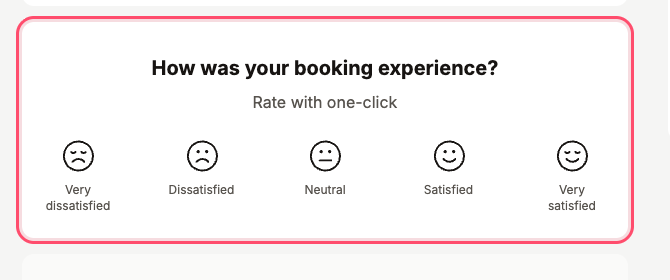
The satisfaction prompt as the traveler sees it, on the booking confirmation page: one click, a 1–5 score, and nothing else — rating is optional and the card has no text input.
What’s never captured: form field values (masked at the source before any event is emitted), full IP addresses (truncated to /24 IPv4, /48 IPv6 at ingest), or anything from the partner’s page outside the button’s own DOM node — see Footprint on the partner page above.
On partner pages, the button runs in a scoped mode that disables all page-wide capture — only the categories above are ever collected. A field-level itemized inventory (every event name and envelope field) is provided as part of partner security reviews.
Platform controls
Section titled “Platform controls”| Control | Detail |
|---|---|
| Field-level encryption | AWS KMS, for sensitive PII fields |
| Audit logging | AWS CloudTrail, across the platform |
| Access control | Role-based access control (RBAC) |
| Infrastructure | Infrastructure as code — no manually-provisioned production resources |
| Network protection | AWS WAF with rate limiting on sensitive endpoints |
| Transport | TLS 1.2+ with HSTS enforced |
| Secrets | Held in AWS Secrets Manager — never in code or config |
Sub-processors
Section titled “Sub-processors”| Sub-processor | Purpose |
|---|---|
| AWS | Hosting and infrastructure |
| Spreedly | Payment card vaulting and forwarding |
Compliance posture
Section titled “Compliance posture”Movmo is not SOC 2 certified today. The controls a SOC 2 audit examines — encryption, audit logging, least-privilege access, infrastructure as code — are in place, and we are confident we can certify on the timeline a partner requires.
If your security team needs to go deeper, ask — Movmo can provide a data-flow diagram, a PII inventory, and encryption/access documentation, and is glad to walk through any of it live.